Pixel Retro: Integrating a Distinctive Display Font into Modern Design Workflows
In the contemporary digital landscape, where screen real estate is at a premium and attention spans are fleeting, visual hierarchy is not merely an aesthetic choice—it is a functional necessity. Among the myriad of typographic tools available to designers, developers, and content creators, Pixel Retro stands out as a specialized asset that bridges the gap between nostalgic charm and modern usability. This retro display font is not just a decorative element; it is a strategic component that can define the tone of a project, enhance brand recognition, and guide user interaction when integrated correctly into a broader design workflow.
For professionals ranging from freelance marketers to small business owners, understanding how to deploy specific typefaces effectively is crucial. Pixel Retro offers a unique texture that evokes the early days of computing and gaming, yet its clean lines and structured geometry allow it to function within modern interfaces without causing readability issues. The key to leveraging this font lies in treating it not as a standalone solution, but as a powerful accent within a cohesive system. By exploring its applications before, during, and after the creative process, users can unlock its full potential for various projects, from branding identities to digital marketing campaigns.
Understanding the Role of Pixel Retro in Visual Communication
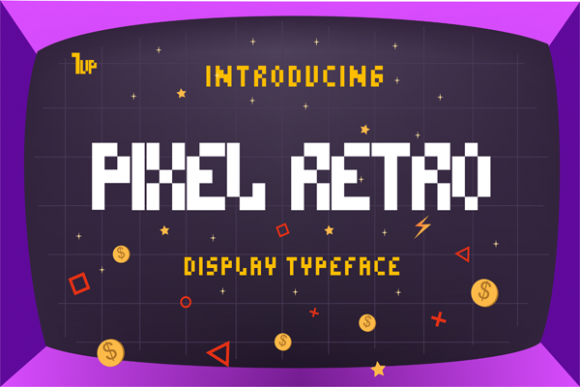
Before diving into implementation, it is essential to understand what Pixel Retro brings to the table. As a display font, its primary purpose is to capture attention and convey mood rather than to facilitate long-form reading. Its "awesome" quality, as often described by enthusiasts, stems from its ability to instantly communicate a sense of playfulness, nostalgia, or technological heritage. However, this strength requires careful handling. Misuse can lead to cluttered designs or poor accessibility standards, while precise application can elevate a project from ordinary to memorable.
The font fits perfectly into designs that require a distinct personality. Whether you are creating a logo for a tech startup, designing a poster for a retro-themed event, or crafting social media graphics for a gaming blog, Pixel Retro provides a visual anchor. It interacts with other design elements by demanding space and contrast. Because of its blocky, pixelated nature, it does not blend easily into background textures; instead, it demands to be seen. This characteristic makes it ideal for headlines, titles, buttons, and short phrases where immediate impact is required.
Compatibility and Technical Considerations
One of the first steps in integrating Pixel Retro into your workflow is ensuring technical compatibility. Modern web development relies heavily on web fonts (WOFF2 formats), and it is vital to verify that the version of Pixel Retro you are using supports these formats for optimal loading speeds across different browsers. For print-based workflows, such as business cards or physical merchandise, high-resolution vector versions or embedded raster images at 300 DPI are necessary to maintain the crispness of the pixel edges.
Furthermore, consider the pairing strategy. Pixel Retro has a strong visual voice, which means it should typically be paired with a neutral, highly legible sans-serif font for body text. Fonts like Helvetica, Roboto, or Open Sans provide a calm counterpoint to the energetic nature of Pixel Retro. This combination ensures that while the headline grabs attention, the supporting content remains easy to read. Testing these pairings early in the design phase prevents last-minute revisions and ensures a consistent visual language throughout the project.
Strategic Implementation Across Project Lifecycles
Integrating Pixel Retro is not limited to the final design stage. Its influence can be felt throughout the entire lifecycle of a creative or business project. Here is how it fits into different phases of work.
Pre-Production: Branding and Concept Development
During the planning and conceptualization phase, Pixel Retro can serve as a mood setter. If a client or personal project aims to evoke feelings of innovation rooted in history, or if the target audience includes millennials and Gen Z who have a affinity for vaporwave and synthwave aesthetics, selecting Pixel Retro early on can guide color palette choices and imagery styles. It suggests a palette of neon accents against dark backgrounds, or muted pastels with high contrast. Deciding on the typography early helps align the rest of the creative team—graphic designers, copywriters, and video editors—toward a unified vision.
For educators and bloggers, choosing this font for course titles or blog headers can signal a niche focus. A coding tutorial series titled with Pixel Retro immediately communicates a tech-savvy, perhaps slightly geeky, approach to learning, attracting the right demographic of students.
Production: Execution and Asset Creation
When moving into the execution phase, the practical application of Pixel Retro requires attention to detail. Due to its geometric structure, kerning (the spacing between individual characters) plays a critical role. Unlike fluid serif fonts, pixel fonts can appear uneven if letter spacing is not meticulously adjusted. In design software like Adobe Illustrator or Figma, manually tweaking the tracking can prevent letters from visually clashing or appearing too sparse.
- Headlines and Titles: Use Pixel Retro for main headings to establish hierarchy. Ensure the size is large enough that the pixel details remain visible but not jagged on high-resolution screens.
- User Interface Elements: For app or website buttons, this font works well for short labels like "START," "PLAY," or "MENU." Avoid using it for dynamic text that changes length, as the fixed width of pixels may cause alignment issues in responsive layouts.
- Social Media Graphics: Create templates where Pixel Retro is used for the hook or quote, while the explanatory text uses a standard sans-serif. This variation keeps social feeds engaging without sacrificing readability.
It is also important to consider accessibility. While Pixel Retro is visually striking, it may fail WCAG (Web Content Accessibility Guidelines) contrast ratios if used in light colors on white backgrounds. Always test the font against its background to ensure sufficient contrast for users with visual impairments. Using tools like contrast checkers during the production phase saves time on compliance audits later.
Post-Production: Maintenance and Scaling
Once a project is live, the consistency of Pixel Retro becomes part of the brand maintenance routine. If the font is licensed for commercial use, ensure that all future materials adhere to the same typographic rules. For freelancers and agencies, creating a style guide snippet that defines how Pixel Retro should be used—alongside its approved pairings and minimum sizes—helps maintain quality control as new team members join or as projects scale.
Long-term use also involves monitoring performance. If Pixel Retro is used in web headers, monitor page load times. Custom fonts can add to the payload of a webpage. Optimizing the font file by removing unused glyphs or subsetting the font can improve site speed, which is a critical factor for SEO and user experience. Regularly reviewing how the font renders on new devices and operating systems ensures that the design remains robust over time.
Practical Tips for Maximizing Impact
To get the most out of Pixel Retro, adopt a disciplined approach to its usage. Less is often more with display fonts. Reserve it for moments of emphasis. Overusing it can dilute its impact, making every element feel equally loud and leading to visual fatigue for the viewer.
- Limit Variations: Stick to one weight and style of Pixel Retro per project. Mixing multiple variations can create chaos. Let the content structure provide the variation, not the font itself.
- Contextual Relevance: Ensure the use of Pixel Retro aligns with the message. It might be inappropriate for serious corporate reports or medical information, where clarity and trust are paramount. It shines in entertainment, gaming, fashion, and creative industries.
- Iterative Testing: Print proofs or view designs on mobile devices early. What looks balanced on a desktop monitor may appear cramped or illegible on a smartphone screen due to the pixel density.
By viewing Pixel Retro not just as a pretty font but as a strategic tool within a larger workflow, creators can achieve results that are both aesthetically pleasing and functionally effective. Its ability to evoke emotion while maintaining structural integrity makes it a valuable addition to any designer’s toolkit. Whether you are launching a new product, updating a blog, or rebranding a service, thoughtful integration of Pixel Retro can help tell your story with clarity, character, and confidence.
Ultimately, the success of using Pixel Retro depends on the intentionality behind its deployment. When paired with solid design principles, compatible assets, and a clear understanding of the audience, it transforms from a simple typographic choice into a powerful driver of engagement. Explore its endless variations, experiment with combinations, and integrate it smoothly into your routine to see how it enhances your creative output.