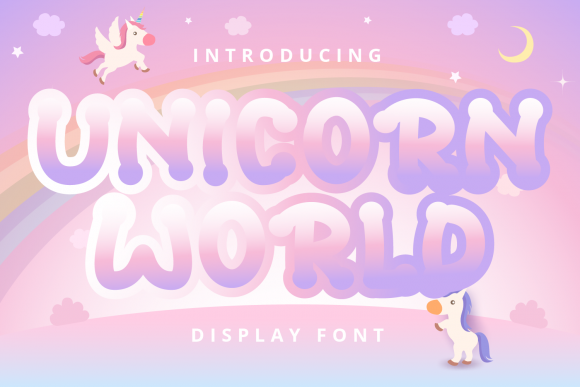
Unicorn World: A Sweet and Bubbly Display Font for Creative Projects
When you are designing a project that needs to convey joy, whimsy, or a touch of magic, the typography you choose plays a pivotal role in setting the tone. Unicorn World is a sweet and bubbly display font that has gained popularity among creators looking to add personality to their work. Whether you are working on cartoon-related designs, children’s games, inspirational quotes, titles, brand names, book covers, posters, or any creation that requires a distinct touch of beauty, this font is a great choice.
However, selecting a display font like Unicorn World is not just about picking something that looks cute. It involves understanding its specific characteristics, knowing where it shines, and avoiding common pitfalls that can undermine your design’s effectiveness. This guide explores how to use Unicorn World wisely, ensuring your projects look professional while maintaining that signature playful charm.
Understanding the Appeal of Unicorn World
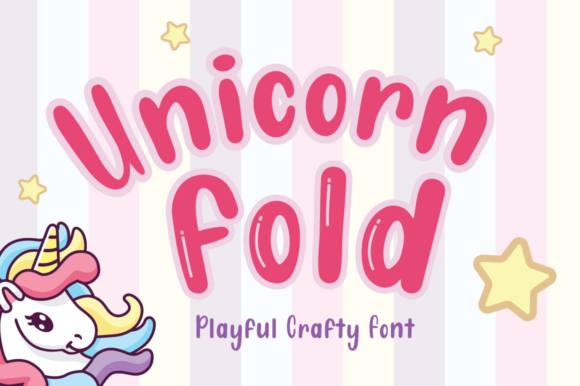
Unicorn World is characterized by its rounded forms, soft edges, and lively structure. Unlike rigid sans-serifs or formal serifs, this font exudes a sense of fun and approachability. It is designed to grab attention without being aggressive. For designers targeting audiences who appreciate lighthearted aesthetics—such as parents, young adults, or fans of pop culture—this typeface offers an immediate emotional connection.
The font’s versatility allows it to be used across various mediums. From digital graphics to printed merchandise, its bold yet friendly appearance ensures readability even at smaller sizes, provided it is used correctly. Its ability to transform a mundane title into something eye-catching makes it a valuable asset in a designer’s toolkit.
Common Mistakes When Using Display Fonts
While Unicorn World is a delightful choice, many users fall into traps that reduce the impact of their designs. Being aware of these errors can save you time and prevent frustrating revisions.
Overusing the Font for Body Text
One of the most frequent errors is using display fonts for long paragraphs of text. Unicorn World is meant for headlines, logos, and short phrases. Its bubbly nature becomes fatiguing to read when applied to extended content. Readers may struggle to process information quickly, leading to a poor user experience. Instead, pair Unicorn World with a clean, neutral sans-serif or serif font for body copy. This contrast ensures that the headline pops while the supporting text remains easy to digest.
Neglecting Color Contrast
The sweet and bubbly aesthetic of Unicorn World often pairs well with pastel colors. However, low contrast between the text color and the background can make the font illegible. Soft pinks or light blues on white backgrounds, for example, can cause the letters to blend in, especially if the font weight is thin. Always check your design in grayscale to ensure sufficient contrast. Darker shades of the primary colors or adding a subtle drop shadow can enhance readability without compromising the style.
Inconsistent Scaling and Spacing
Display fonts often have unique kerning (space between characters) and tracking (space across words). When resizing Unicorn World, these spaces can become distorted. Too much space can make the word look disjointed, while too little can cause letters to overlap awkwardly. Experiment with different sizes to find the optimal balance. Additionally, avoid stretching or skewing the font digitally, as this distorts its intended proportions and ruins the handcrafted feel.
Strategic Applications for Maximum Impact
To get the most out of Unicorn World, consider these practical applications:
- Brand Names and Logos: The font’s uniqueness helps brands stand out. Use it for businesses in the toy, bakery, or entertainment sectors where a friendly image is crucial.
- Event Posters: For birthday parties, baby showers, or themed events, Unicorn World sets the right mood instantly. Combine it with simple icons or illustrations to create a cohesive look.
- Social Media Graphics: Short quotes or announcements benefit from the font’s visual appeal. Ensure the text is large enough to be readable on mobile devices, where most social media consumption occurs.
- Educational Materials: Teachers and educators can use this font for worksheets, certificates, or classroom decorations to engage younger students.
Technical Considerations Before You Download
Before incorporating Unicorn World into your projects, there are several technical details to verify. First, check the licensing terms. Some fonts are free for personal use only, requiring a commercial license for business purposes. Using a font without proper permission can lead to legal issues and unexpected costs.
Next, examine the character set. Does the font include all necessary symbols, numbers, and punctuation marks? A limited character set can restrict your design options, forcing you to mix multiple fonts, which may result in a cluttered appearance. Also, test the font in different software environments to ensure compatibility. While most modern design tools support standard font formats, some older systems might render the font incorrectly.
Pairing Strategies for Balanced Designs
A well-designed layout relies on harmony between different typographic elements. Since Unicorn World is visually dominant, it should be paired with understated fonts. Here are some effective combinations:
- Unicorn World + Clean Sans-Serif: Pair the playful header with a minimalist sans-serif like Helvetica or Arial for body text. This creates a clear hierarchy and keeps the design modern.
- Unicorn World + Elegant Serif: For a more sophisticated take, combine the bubbly font with a refined serif like Garamond. This juxtaposition can work well for high-end children’s book covers or luxury boutique branding.
- Unicorn World + Handwritten Script: Use a delicate script font for secondary text or signatures. Ensure the script does not compete with the main title; it should complement it subtly.
Final Thoughts on Choosing the Right Tool
Unicorn World is more than just a decorative font; it is a tool for communication. When used thoughtfully, it can elevate your designs, making them memorable and engaging. By avoiding common mistakes such as overuse, poor contrast, and improper scaling, you can harness its full potential.
Remember to always prioritize readability and context. Ask yourself: Does this font serve the message? Is it appropriate for the target audience? If the answer is yes, then Unicorn World is likely a strong candidate for your next creative endeavor. Take the time to experiment, test different pairings, and refine your choices. With careful consideration, you can create designs that not only look beautiful but also resonate deeply with your viewers.
Whether you are a seasoned professional or a beginner exploring the world of graphic design, Unicorn World offers a versatile and charming option for adding a touch of whimsy to your work. Embrace its unique qualities, respect its limitations, and let your creativity soar.